
Automated Transfer
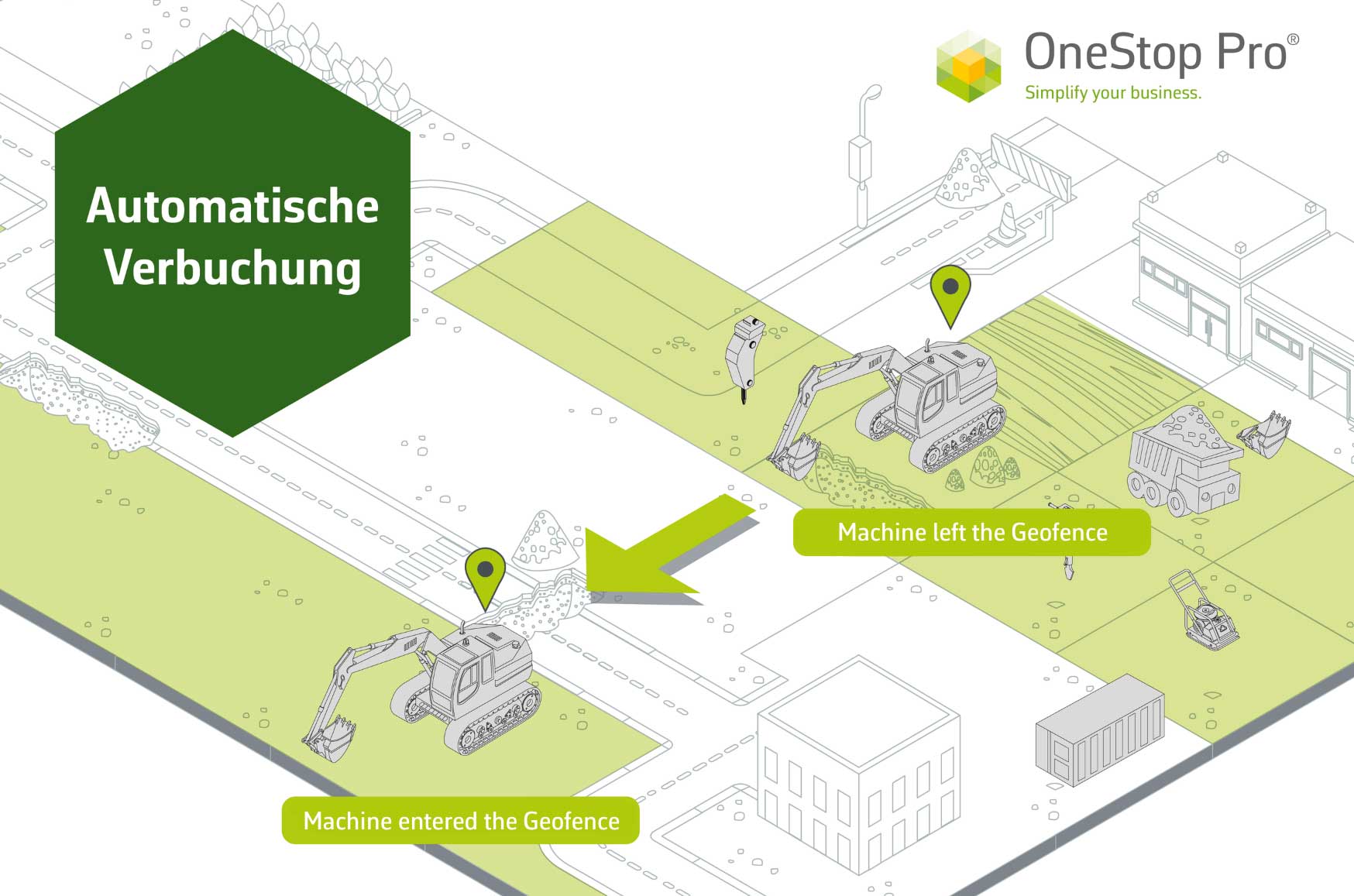
Machines are automatically assigned to their current location of use, without any manual input. Movements between the construction sites or warehouses are detected in real time and recorded directly in the system.
Benefits of the Automated Transfer
 Reduction and elimination of manual work steps: Geofences and telematics do the work. Real-time tracking: provides live status and location data directly in the software, ensuring full visibility of where equipment is and whether it is assigned to a construction site or a warehouse. Site-specific data: precise entry and exit times for accurate project-based billing. Reduced workload for employees
How it works
The automated transfer is based on the interaction between geofences and our wired retrofitted telematics, GPS Battery Tracker and Bluetooth Trackers. Simple, brand-independent and effective:
1. Equip assets: install the appropriate hardware in machines, vehicles, or equipment.
2. Activate and configure the automated transfer, for example by defining the time threshold after which a piece of equipment is assigned to a geofence.
3. Define geofences: create digital boundaries around storage areas or construction sites in OneStop Pro.
4. Automatic tracking: when an equipment enters or leaves a defined geofence, the telematics system detects the movement and the software automatically assigns it to the relevant construction site or storage location.
The automated transfer is included as part of our All-Inclusive product:

All-Inclusive
Everything included!